
How I Fixed an App Store Subscription Rejection for My iOS App (Guideline 3.1.2)
When I shipped an update for Secret Gift - Prize Draw app with a new subscription paywall, I thought it would be a straightforward review. Instead, the update came back rejected under App Store Guideline 3.1.2(c) - the rule that covers how you present auto-renewable subscriptions.
In this post I'll walk through what went wrong, what Apple actually expects, and the exact changes I made to get the subscription screen in my app approved.
What Guideline 3.1.2(c) Really Requires
Guideline 3.1.2(c) is about clarity: users must clearly understand what they are buying before they subscribe. Apple ties this to Schedule 2, Section 3.8(b) of the Paid Applications Agreement, which defines what information you must "clearly and conspicuously" show.
For auto-renewable subscriptions, Apple now expects four key pieces of information to appear inside your app, before the user confirms the purchase:
- Title of the auto-renewing subscription (can match the in-app purchase product name).
- Length of the subscription (for example: weekly, monthly, yearly).
- Price of the subscription, and price per unit if appropriate.
- Functional links to your Privacy Policy and Terms of Use (EULA).
On top of that, your App Store metadata must also include working links to your Privacy Policy and Terms of Use.
The Original Paywall in my app - What Was Missing
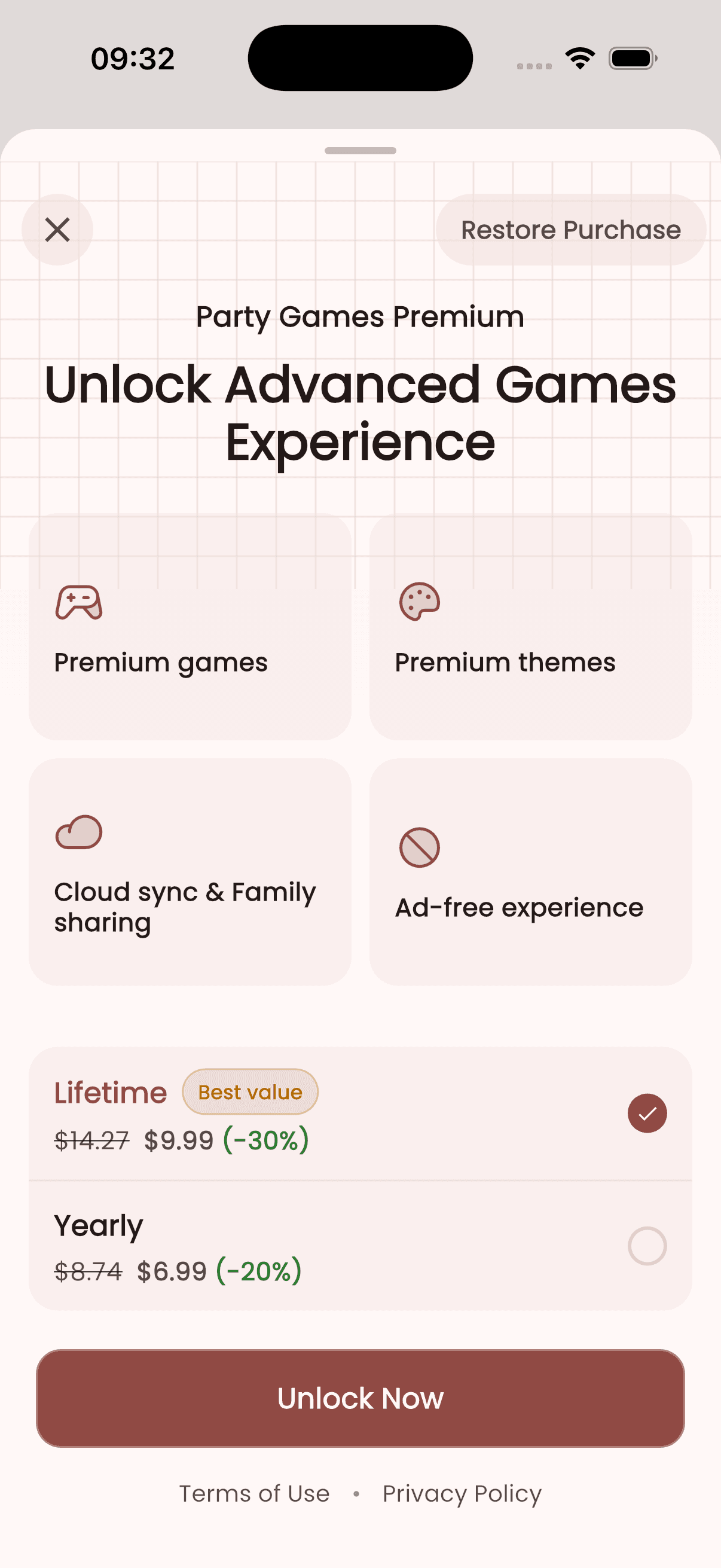
The paywall in my app already looked polished: it had a clear product name ("Party Games Premium"), a list of benefits, and two options - a Lifetime purchase and a Yearly plan. The bottom of the screen included "Terms of Use" and "Privacy Policy" links.
However, the rejection message said I had "not included all the required information for apps offering auto-renewable subscriptions." Looking back at the guidelines, I realised that two important things were either missing or not explicit enough:
- The subscription length for the Yearly plan was not clearly spelled out as "1-year auto-renewing subscription."
- There was no explicit auto-renewal explanation (for example, that the subscription renews automatically and can be managed in account settings).
On the metadata side, Apple also wanted a Terms of Use link in the App Store listing for my app itself, either in the description or in the dedicated EULA field.
Changes I Made Inside the App
To comply with Guideline 3.1.2(c), I updated the paywall in my iOS app to make the subscription details unambiguous.
1. Clarified the subscription title and length
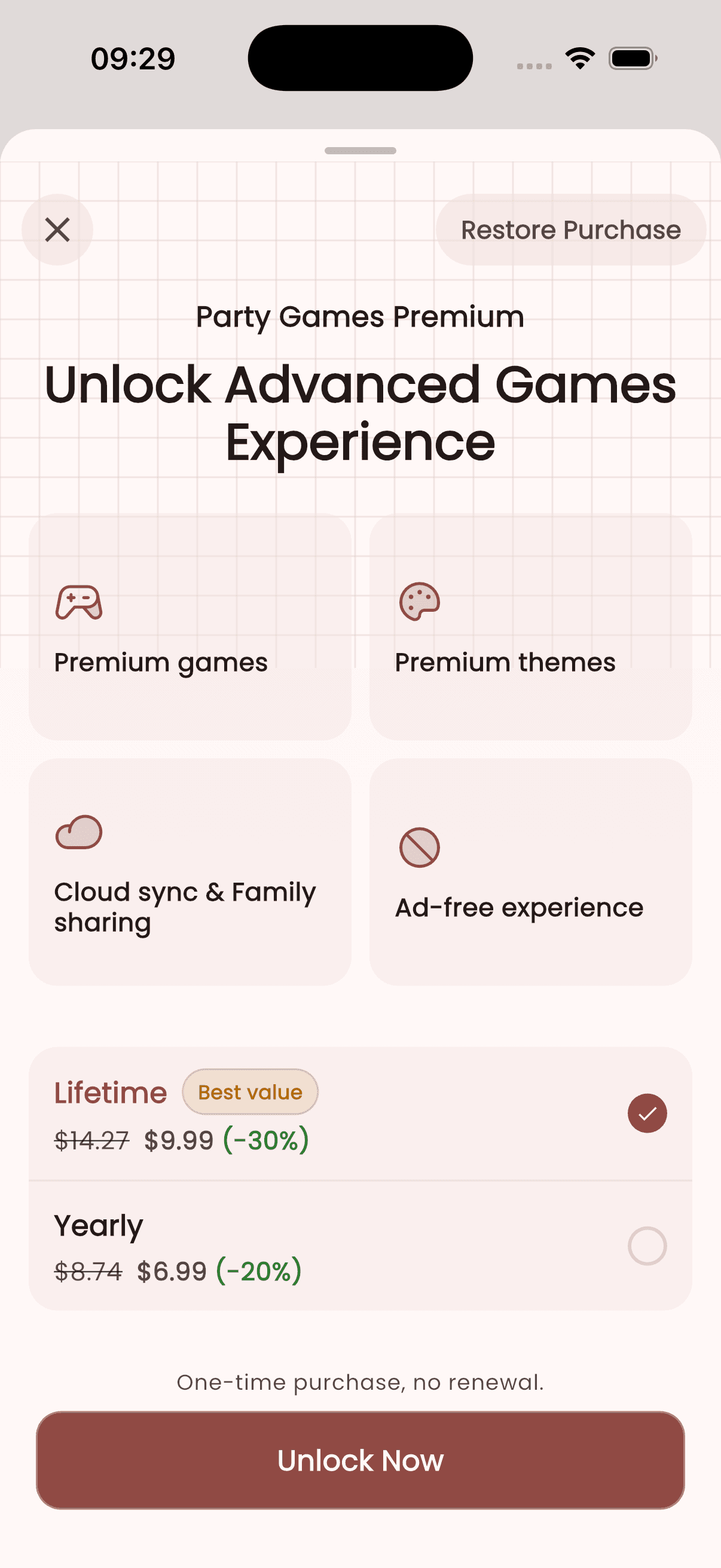
Next to selected subscription plan, I added wording like:
For yearly plan: "1-year auto-renewing subscription."
For lifetime plan: "One-time purchase, no renewal."
This makes it obvious that this is a recurring subscription rather than a one-time payment.
2. Explained auto-renewal and cancellation
Below the pricing options, I added a small legal text block along these lines:
"Payment will be charged to your Apple ID account at confirmation of purchase. Subscription renews automatically unless canceled at least 24 hours before the end of the current period. Your account will be charged for renewal within 24 hours prior to the end of the current period. You can manage or cancel your subscription in your App Store account settings."
This text is based on Apple's own examples from Schedule 2, Section 3.8(b) and typical App Review feedback.
3. Verified the privacy and terms links
The links labeled "Terms of Use" and "Privacy Policy" were already present on the paywall, but I double-checked two things:
- Tapping each link opens the correct URL in an in-app browser or Safari.
- The URLs match what I configured for my app in App Store Connect.
Apple's requirement is that these links are functional and "accessible within your app," not hidden behind an obscure menu.
Fixing the App Store Metadata
Even if your paywall is perfect, App Review can still reject you if your App Store listing is missing legal links.
Here's what I updated for my app in App Store Connect:
- In App Information → Privacy Policy URL, I added the URL of my privacy policy page.
- For Terms of Use (EULA), there are two options:
- Use Apple's standard EULA and link to it in your app description.
- Or provide a custom EULA in App Information → License Agreement.
I chose to host my own Terms of Use and then added at the bottom of my app description:
- Privacy Policy: https://party-games.anng.dev/privacy.html
- Terms of Use: https://party-games.anng.dev/terms.html
This mirrors Apple's recommendation that both links appear in the metadata as well as in the app itself.
The Screen Recording Apple Wants
When you resubmit, Apple often asks for a screen recording that shows where they can find all the required subscription information.
For my iOS app, I recorded a short video on device that showed:
- Opening the app and navigating to the paywall.
- The subscription title, length, and pricing clearly visible next to the Yearly option.
- Scrolling down to the auto-renew explanation text.
- Tapping on "Terms of Use" and "Privacy Policy" to prove that both links open correctly.
I attached this recording to my response in the Resolution Center together with a brief explanation of the changes.
Lessons Learned and Practical Tips
Getting rejected for Guideline 3.1.2(c) is frustrating, but the fix is usually straightforward once you know what Apple is looking for.
Here are the practical takeaways from my experience:
- Don't assume a pretty paywall equals compliance; you must cover title, length, price, and legal links explicitly.
- Treat the auto-renewal explanation as mandatory boilerplate; reuse it across all paywalls in your app.
- Keep your Privacy Policy and Terms of Use URLs consistent between App Store Connect and the in-app links.
- When in doubt, include a short legal section under your pricing explaining billing, auto-renewal, and cancellation.
- Always be ready to show a quick screen recording highlighting exactly where reviewers can find each required item.
If you're designing or revisiting your own subscription screen, use this checklist before submitting: title, duration, full price, privacy link, terms link, and a clear note about auto-renewal and cancellation.
That small bit of extra clarity can save you days of back-and-forth with App Review, just like it did for Secret Gift - Prize Draw.